Setup Azure batch compute environments#
Based on our discussion and the documentation and FAQ
Setup Permissions#
Here are the key points with setting up Azure Infrastructure using a Managed Identity and Batch Pool.
On Azure#
Create a service principal
Create a managed identity
Assign roles to the service principal and managed identity
Increase quota for the Azure Batch Account
Create Azure Batch pools in the Batch account
Attach nodes to the virtual network in the right subnet
Whitelist internet access on the subnet.
On Seqera Platform within a workspace:#
Admin permissions to add credentials, compute environment(s) and pipelines to a workspace
On VMs as nodes in a pool#
Nodes in a pool are described based on the VM naming convention:
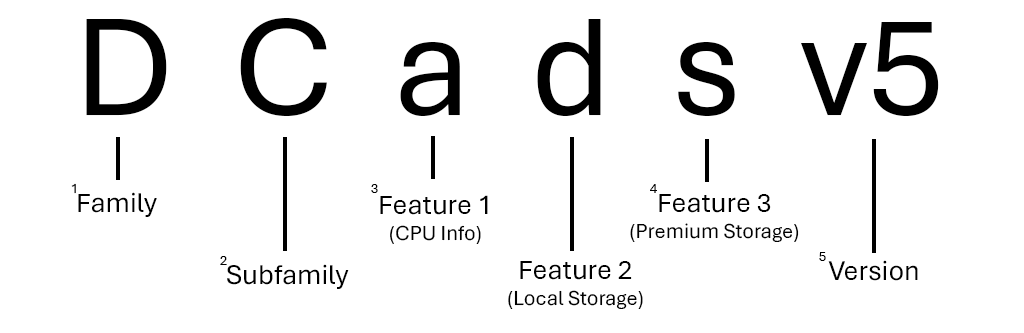
See also Azure Batch documentation.
Local storage of a VM is one-to-one in line with the number of CPUs. See the
Local Storagetab for a machine in a series to find out more. See for example the Ddsv4 sizes series.
Spreading vs Packing nodes in a pool#
Defines how jobs are packed on nodes. Packing puts as many tasks as possible on a single node. Spreading starts new nodes for each task by default. See the documentation for more details: azure/batch/batch-parallel-node-tasks
Troubleshooting#
Connection issues#
If you encounter connection issues when launching pipelines from Seqera using Azure Batch compute environment, try to increase the timeout settings in the Compute Environment configuration on Seqera Platform to around 8-16 hours.
NXF_OPTS="-Dsun.net.client.defaultConnectTimeout=30000 -Dsun.net.client.defaultReadTimeout=60000"
Here are some example screenshots for setting it as global Environment variables

So you will need to set the NXF_OPTS environment variable in the Compute Environment
configuration on Seqera Platform to
-Dsun.net.client.defaultConnectTimeout=30000 -Dsun.net.client.defaultReadTimeout=60000
Example error message:
The workflow execution failed to start. Exit status: 1
ERROR ~ Unable to access config file 'https://api.cloud.seqera.io/ephemeral/<ephemeral-id>' -- Cause: Server returned HTTP response code: 403 for URL: https://api.cloud.seqera.io/ephemeral/<ephemeral-id>
Server returned HTTP response code: 403 for URL: https://api.cloud.seqera.io/ephemeral/<ephemeral-id>
-- Check 'nf-2OSwVxmg7B2QQt.log' file for details
VM sizes#
To handle workflows with a mix of low and high memory requirements, consider
to let Seqera create multiple Azure Batch pools with different VM sizes based
on process requirements. This can be achieved by using the autopool feature.