 Data Catalog User Guide (v0.1.4-beta)
Data Management Plan
The Data Management Plan (DMP) helps you describe how your project’s data will be handled during the project and after it is completed. It ensures compliance and supports good research practices.
You can access the DMP from your project’s home page under the DMP tab.
How to complete the DMP
The DMP is divided into several section(s). Each group contains fields that require your input
Let’s look at each group in detail:
1. Project Metadata
In this section you select the expected project end date. You can edit it later if needed.
2. Contact Person
In this section you add one or more contact persons for the project. Each entry includes the following fields:
Role (e.g., Project Creator, Principal Investigator)
Name
Email
ORCID (your unique researcher identifier)
Long-term data responsible person
If you are the Project Creator, your name and email will be pre-filled automatically. You only need to add your ORCID and indicate whether you are the long-term data responsible person.
3. Funding
Here you can enter the funding details:
Funding Identifier (e.g.,https://ror.org/027754r66)
Funder Name (e.g., Novo Nordisk Foundation)
Funding Status which can be:
Planned
Applied
Granted
Rejected
4. Data Collection
This section focuses on whether this project uses external data.
If yes, you can add information about each external data source by providing a Title and a short Content description. You can add as many entries as needed.
5. Data Storage & Backup
This section covers questions about how and where your data will be stored and backed up during and after the project is finished:
Important
All project and dataset metadata during the project will be stored in the BRIGHT Data Catalog and backed up daily. All raw and processed files will be stored in a cloud storage (currently a Microsoft Storage account; Region: West Europe)
Additional data storage: Select any secondary storage location from the dropdown.
Physical data location: Provide details about where physical copies (if any) are stored.
Backup solutions: Describe any other backup solution (e.g., Additional backups on my personal laptop are stored on an external hard drive).
Warning
Be aware that if you store data in DTU M-drive or DTU personal OneDrive, your data WILL BE DELETED after your employment ends.
6. Documentation
Provide details about project documentation:
Documentation: List documentation formats
Example: All electronic lab notebooks (ELNs) will be stored in Benchling project folder ‘Microbial_soil_community’. Whenever applicable, a README file will be created for each dataset, detailing the data collection methods, processing steps, and any relevant metadata.
7. Data Sharing, Access & Compliance
This section includes a series of questions about compliance and data sharing. Most questions are answered by choosing Yes, No, Uncertain, or Not applicable (dependig on the field):
Biological Material: State whether the project uses biological material such as microorganisms or material of animal, plant, or human origin.
Medicines, Drugs, Radioactive Isotopes: State if any of these substances are part of the project.
Toxic Substances: Answer whether toxic chemicals or naturally produced toxins are used.
Nanoscale Practicles: Specify how nanoscale materials are handled.
Personal Data (GDPR): State if any personal or sensitive data is involved in the project, such as age, DNA, RNA, biometrics, etc.
Access Controlled Inside and Outside Data Catalog: Describe how access to the data is controlled both inside and outside BRIGHT Data Catalog.
Sharing After Project Ends: Explain what will happen to the data once the project is complete. For example, whether it will be deposited in DTU Data, shared on GitHub, or restricted due to NDA/GDPR.
Note
→ Restricted: Access for all project, dataset metadata and files in Microsoft Azure Storage account is restricted to project members and collaborators.
→ BRIGHT-visible: READ-ONLY access for project and dataset metadata is granted to all BRIGHT employees. Access to files in Microsoft Azure Storage account remains restricted to project members and collaborators.
DMP Progress Overview
The DMP page provides an overview of your progress. You can track how many questions you have already completed and how many are still left to complete.
Export DMP
Once the DMP is completed, you can export it for sharing or documentation purposes.
You can export the DMP as:
PDF
JSON
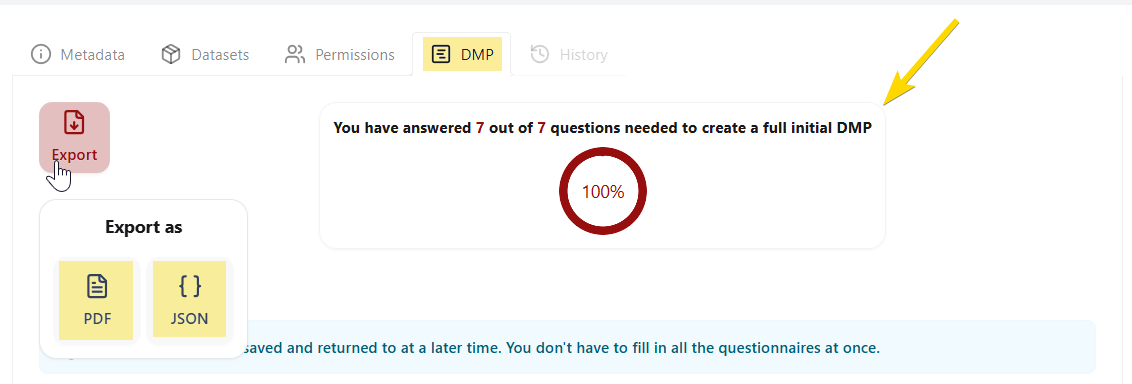
DMP Export & Progress Overview
API Availability
Some of the fields used when creating a DMP can also be set programmatically. For more details, see the following endpoints in the API Reference: